

Casushi App for Quick Download in UK
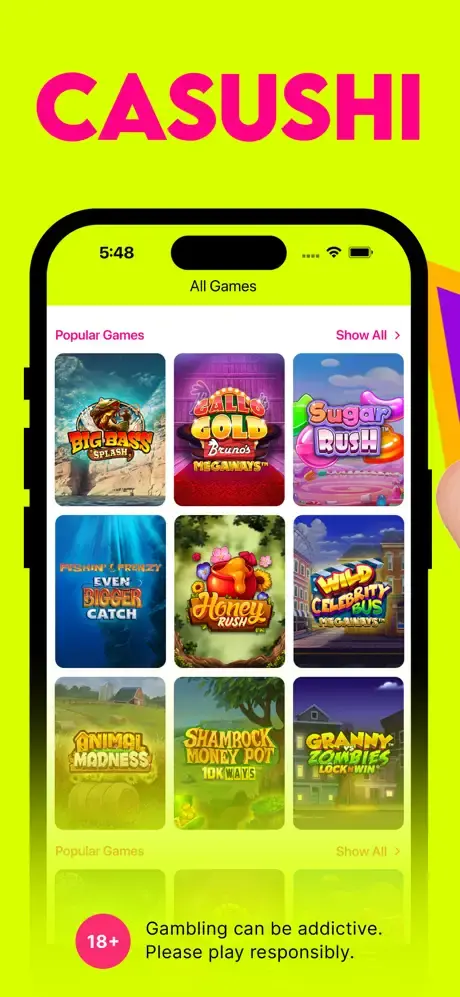
UK players can download the Casushi app on their Android and iOS devices. Once installed, you can play on the go and claim personalised promotions. Additionally, this method offers you push notifications, allowing us to send you the latest promotional deals directly to your phone. The gameplay optimization is based on a simple user interface, fast loading times and HTML5 technology. The iOS version is available only on the App Store, while the Android users can get our PWA application. Keep in mind that mobile gambling is possible via a web browser. Below is an app overview table.
| Feature | Specifics | For UK Customers |
| OS | iOS and Android | Full compatibility |
| Game Count | 3,000+ | Unlimited access |
| Min deposit | GBP 10 | Available |
| Support | Live chat and email | Full access |
How to Download the Casushi Casino App: A Step-by-Step Guide
Customers who prefer mobile gambling can download the Casushi casino mobile application to their devices using this guide.
- Start installation: Visit the App Store on iOS and in the search bar type in “Casushi”. Android users can open features on the web browser while on our site.
- Get the app: On iOS, click “get” while on Android, click “add to home screen.”
- Approve: Make sure to accept the installation.
- Launch: Once done, tap the icon to enjoy fast loading times and vertical orientation for gambling.
Both versions of the software support dark mode, live dealer games and have an intuitive layout.
How to Use and Install the Casushi App on Android
The Android Casushi mobile installation process is simple and takes a couple of minutes. All you have to do is follow these steps.
- Load the website: Use a web browser to load our site. There’s no installation file.
- Initiate process: Open the features on the mobile browser.
- Start the installation: Find and tap the “Add to home screen” setting.
- Approve: Make sure to wait for the safety check to complete and approve the installation.
- Launch it: Wait for the setup to complete and open the application to log in or create a new account.
- Deposit: Use one of the banking methods to fund the balance and load a game.
- Adjust the bet: Use the + and – buttons or on-screen controls to adjust the bet size.
- Play: Click the play or spin button and enjoy.
How to Install the Casushi App on iOS
The iOS Casushi app is available on the App Store, so it comes without any Google Play restrictions. To complete the installation process, follow this guide.
- Load the App Store: Visit the official store and type in “Casushi”.
- Get: tap the “Get” to start the installation.
- Open app: Once you receive the installation complete notification. Launch the software.
- Log in: Log in to your account and deposit funds if the balance is GBP 0.
- Load a game: Find a game you wish to play and use the on-screen buttons to adjust the wager.
- Play: Confirm the wager and spin the reels or start the round.
iOS users can also use the PWA version. Just load the site using Safari and click “Share.” Tap on the “Add to home screen” and approve. This version offers the same security settings, and the icon will be added to the App Library.
PWA Version for All Devices: A Flexible Mobile Option
The Casushi casino app is compatible with countless devices and offers a few advantages.
- Easy to install: You can install it in Safari or Chrome in seconds. Just tap to add to home screen setting.
- Automatic updates: The software will update every time we update the website.
- Works on most OSs: You can install it on almost any version of iOS and Android.
Troubleshooting Installation Issues with the Casushi Casino App
It’s rare, but possible, to encounter complications during the Casushi app installation process. Here are a few possible fixes.
- Minimum OS requirements: The PWA version requires Android 6.0 or iOS 10. iPhone version minimum requirement is iOS 13.0.
- Required specs are low: The minimum specs require 2GB of RAM on Samsung or Apple devices.
- Slow performance: Update OS to get the latest features and improve stability and usability.
Interface and Key Mobile Features of the Casushi Casino App
The progressive web app and the native iOS app come with powerful, useful features that British players need to know about. In addition to letting you enjoy over 3,000 games with nothing more than your smartphone or tablet, the software enhances the overall gambling experience. The main features are mentioned in the following table.
| Feature | Explanation |
| Cross-platform support | It works on Chrome, Safari, Opera and other browsers. |
| Small size | The iOS conversion is only 14.9 MB. It can save space on your phone. |
| Instant play | Play anywhere you are without downloading a game. |
| Push notifications | Get the latest Casushi mobile deals. |
Bonuses for Mobile App Players: Maximise Your Rewards
Via the Casushi mobile app, players from the United Kingdom can claim various bonuses and promotions. Now you can play on the go with more funds and place more wagers on the games. Available offers that are active today are:
- Welcome offer
New players can get the full experience with the welcome offer. We provide 100 free spins for the Big Bass Splash. Deposit GBP 10 and stake it on slots. For your convenience, we offer a 48-hour period during which you have to use the offer.
- Win a share of GBP 25 million
Using the functionality of the software, you can participate in tournaments. We host daily, weekly and monthly options. Use the touch controls to play specific games and win a portion of the GBP 25 yearly prize pool.
Casushi App vs Desktop Version: Which One is Best for You?
Via the Casushi casino mobile software, players get many features and security systems implemented that can improve the overall experience. But thanks to the cross-platform compatibility, desktop gamblers get some perks as well. These are explained in the table below.
| Feature | Mobile App | Desktop |
| Login | Biometric login, face ID and email/password. | Email and password |
| Accessibility | Play anywhere | At home |
| Performance | Fast loading times | Stable gameplay |
| Updates | More frequent | Stable version |
| Deposits | Single wallet | More options |
| Verification | Easier photo upload | – |
| Data entry | Manual | Auto-fill |

Managing Notifications and In-App Controls
If you want to get a promo code and other promotions via the Casushi casino app, use the push notification feature. First, enter the settings on your device and go to app notifications. Turn on the push notification offer feature. You will now receive details about an incentive when it’s available to you. This method also allows you to get details about the casino’s loyalty points and updates. You can claim on mobile all the promos we share with you.
Security and Data Protection in the Casushi Casino App
The Casushi mobile app is designed to offer the latest security technologies. The secure login is possible via SSL encryption of the latest generation. Account safety is paired with KYC, used to verify your identity, and AML, which prevents unauthorised casino use.
Additional data protection technologies are in place. One of them is two-factor authentication, which adds a second layer of security when a player tries to log in or cash out.